Hawiya · هوية · On-premise SSO
On-premise SSO on your servers, even with no internet connection.
Okta, OneLogin and Microsoft Entra ID run in their makers’ clouds. When your sign-in has to stay inside your own network, Hawiya is designed to be installed there: single sign-on, passkeys and authenticator apps, your Active Directory, sign-in rules and the audit log, on servers you control, in Arabic and English.
- Your servers or an isolated network
- Nothing sent to an outside cloud
- The same product as hosted Hawiya
Authorized vendor to
- Ministry of Finance
- Ministry of Interior
- DGE Abu Dhabi
- Etihad Aviation
- EDGE Group
Delivered for
- Hindustan Unilever
- Nokia
- Linde
- USA Today
- JSL
Procurement-ready
- Emirati national company
- National ICV certificate
- Abu Dhabi Government Procurement Gate
- UAE Ministry of Finance, federal procurement
- Registered ADNOC vendor
Why on-premise
When sign-in can’t depend on someone else’s cloud
Your data stays put
Accounts, sign-in records and the keys that sign every session stay on servers you control.
Isolated networks
Operational and classified networks with no internet connection still need single sign-on and a second factor.
Your rules, your auditors
Data rules, procurement terms or your own policy may rule out a foreign cloud for the system that controls access to everything else.
What we install
From empty servers to signed-in apps
- 01
Plan
We agree the servers, the database, the network zones and the apps to connect, with your infrastructure and security teams.
- 02
Install
Hawiya is designed to run on two or more servers with a standby, from an installer that needs no internet connection.
- 03
Connect
Your Active Directory or LDAP, your apps over SAML 2.0 or OpenID Connect, and your security monitoring for the audit log.
- 04
Hand over
Your administrators get the console, the sign-in rules and the runbook; updates come with the licence.
With no internet connection
What works on an isolated network
Works offline
Passwords, passkeys and security keys, authenticator app codes, Active Directory and LDAP, and every app on the same network.
Needs a connection
UAE PASS, email codes and text messages reach services outside your network, so they are left off an isolated install.
Updates
New versions and security fixes come as packages your team checks and applies, with no outside connection.
Product tour
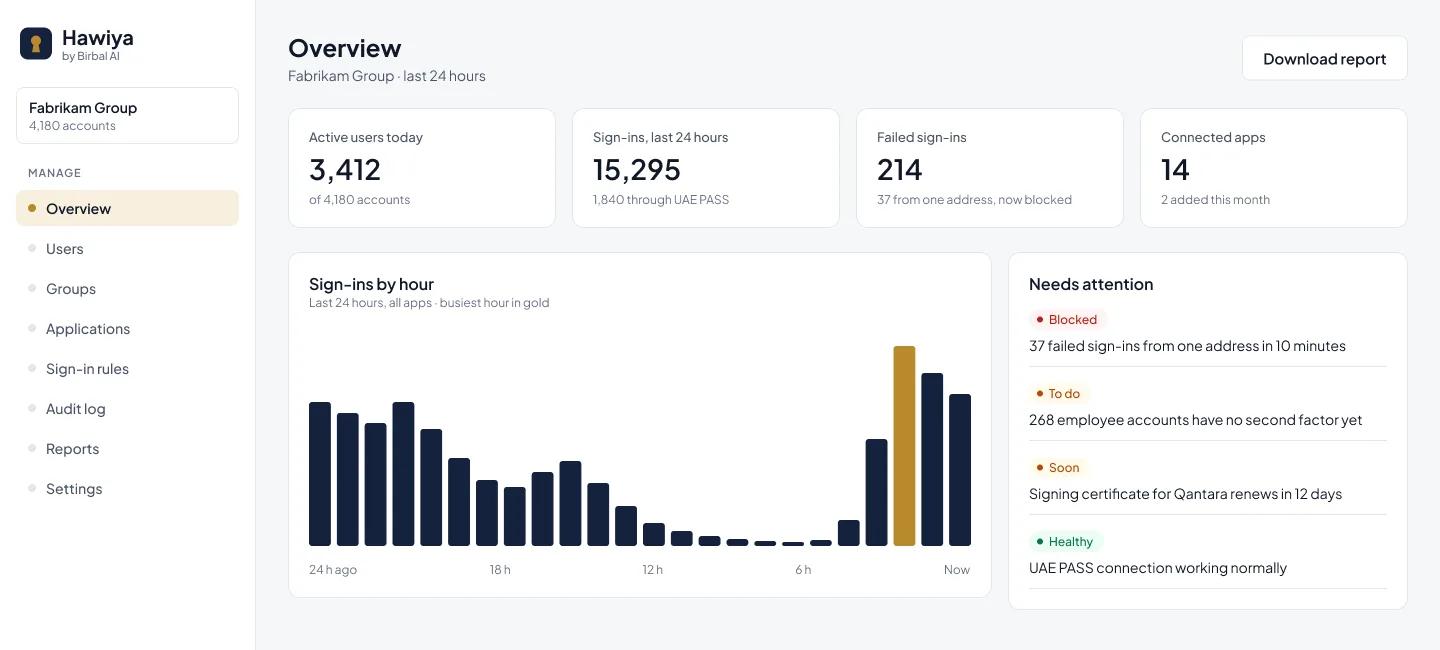
The same console, on your servers
Screens from Hawiya.
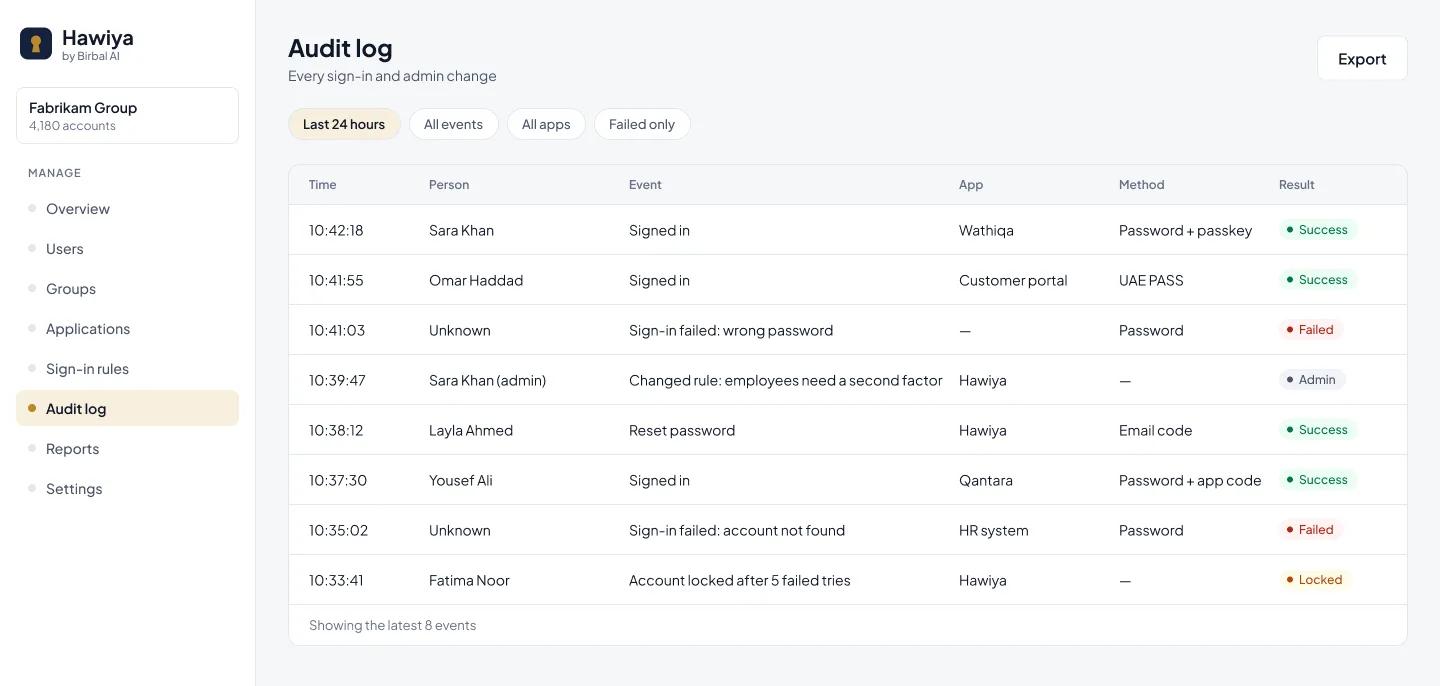
Same product, your hardware
Hosted Hawiya and on-premise Hawiya share one product, one console and one set of updates.
Delegated administration
Admin rights can be split by department, entity or branch.
Built on open source
Hawiya is built on Keycloak, so your configuration follows open standards, not a format only we can read.
Compared
On-premise Hawiya and cloud sign-in services
Cloud facts from each maker’s own pages, checked on 25 November 2026.
| Feature | Hawiya on your servers | Cloud services: Okta, OneLogin, Entra ID |
|---|---|---|
| Where it runs | On servers you control, including isolated networks | In the maker’s cloud. Okta lists cells in the US, Canada, India, the EU, Australia and Japan on AWS; OneLogin names data centers in the EEA; Entra ID maps each tenant to a region such as Europe, Middle East and Africa |
| With no internet connection | Designed to work, with offline factors | Not available: each is a cloud service |
| Updates | Applied by your team when you choose | Applied by the maker |
| Running it | Your team, with Birbal AI’s support | The maker |
Licensing
License Hawiya on your servers or in the cloud
Hawiya is sold as a software licence, not a one-off project. You choose where it runs; the product, updates and support are the same.
On-premise licence
Runs on your servers
Install Hawiya in your data center, in your private cloud tenant or on an isolated network with no internet connection.
- Annual licence, priced by the number of users
- Your data never leaves your network
- Installation, training and updates included
- Support with agreed response times
Cloud subscription
Hosted for you
We run Hawiya for you in a UAE data center, or in a cloud region in your country.
- Monthly or annual subscription, priced by the number of users
- Hosting, backups and monitoring included
- Updates applied for you
- Single sign-on and role-based access
The price depends on the number of users and the support level. We reply within one business day and send a written quote after a short scoping call.
Sources
Where the cloud facts come from
The makers’ own pages, checked on 25 November 2026. Hosting options change, so check the current pages.
Book a walkthrough
Plan single sign-on inside your own network
Tell us about your network zones, your directory and the apps to connect. We walk your team through an on-premise Hawiya and outline what the installation needs.
- Isolated networks included
- In Arabic or English
- Under NDA if you need one
4.9/5 average rating · 98% client satisfaction · 150+ clients served
FAQ
On-premise SSO, answered
What is on-premise SSO?
Single sign-on installed on your own servers rather than used as a cloud service. Your accounts, sign-in records and signing keys stay in your data center.
Can Hawiya run with no internet connection?
Yes, it is designed to. Passwords, passkeys, security keys, authenticator app codes and your directory all work on an isolated network. UAE PASS, email codes and text messages need a connection to outside services, so they are left off.
Can Okta, OneLogin or Entra ID be installed on our servers?
No. They are cloud services run by their makers. Microsoft’s on-premises identity products are Active Directory and AD FS on Windows Server, and Hawiya can use your Active Directory as its source of users.
Who keeps it up to date?
Updates come with the licence. On your servers, your team applies them when you choose, with our support; hosted Hawiya is updated for you.
Can we start hosted and move on-premise later?
Yes. It is the same product, so users, apps and rules can move from hosted Hawiya to your servers.
How is Hawiya licensed?
As an annual on-premise licence installed on your servers, private cloud or an isolated network, or as a monthly or annual cloud subscription that we host in a UAE data center or a cloud region in your country. Both include updates and support.
Single sign-on that never leaves your network
Book a Hawiya walkthrough for an on-premise install.
Book a Hawiya walkthrough