Hawiya · هوية · Active Directory and LDAP
Active Directory SSO an identity provider for your directory and every web app.
Active Directory knows who your people are, but most web and cloud apps can’t use it directly, so each keeps a password of its own. Hawiya is designed to sit between them as your identity provider: it checks people against Active Directory or LDAP, adds a second factor, and signs them in to every app over SAML 2.0 or OpenID Connect. Joiners and leavers stay in the directory, where you handle them today.
- Users and groups from AD or LDAP
- SAML 2.0 and OpenID Connect
- A second factor at one sign-in
Authorized vendor to
- Ministry of Finance
- Ministry of Interior
- DGE Abu Dhabi
- Etihad Aviation
- EDGE Group
Delivered for
- Hindustan Unilever
- Nokia
- Linde
- USA Today
- JSL
Procurement-ready
- Emirati national company
- National ICV certificate
- Abu Dhabi Government Procurement Gate
- UAE Ministry of Finance, federal procurement
- Registered ADNOC vendor
How it works
How Hawiya connects Active Directory to your apps
- 01
Connect the directory
Hawiya connects to Active Directory or another LDAP directory over an encrypted LDAPS connection and reads users and groups.
- 02
Check the password there
At each sign-in the password is checked by the directory itself; Hawiya never copies passwords out of it.
- 03
Add a second factor
A passkey, a security key or an authenticator app, by the rules you set for each group.
- 04
Sign in to every app
Apps connected over SAML 2.0 or OpenID Connect trust Hawiya’s sign-in, so people sign in once.
Identity provider
What an identity provider adds to Active Directory
The identity provider is the service apps send people to for sign-in. With Hawiya as yours, every app trusts the same sign-in.
One place to sign in
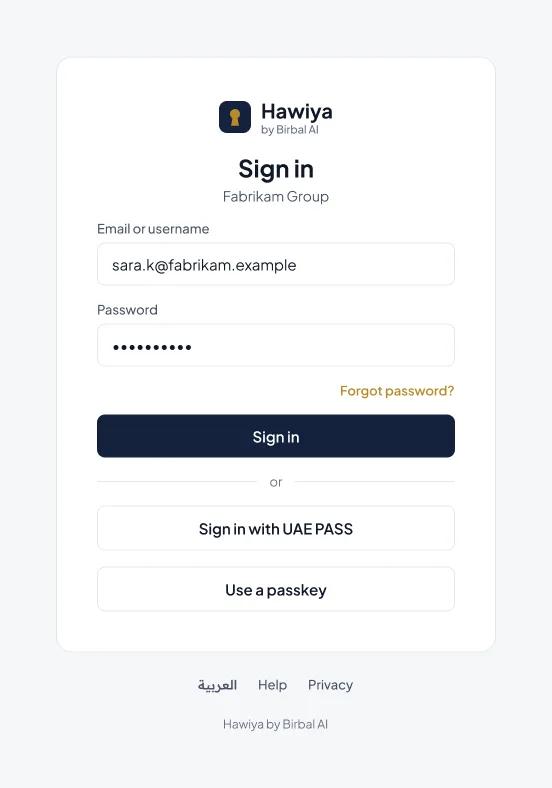
People sign in once at Hawiya, with their Active Directory password and a second factor, and every connected app opens.
Groups become access
Active Directory groups decide which apps each person can open, so access follows the groups you already keep.
Leavers lose every app at once
Disable the account in Active Directory and the next sign-in through Hawiya fails for every connected app.
Cloud and web apps
SaaS apps and your own web apps over SAML 2.0 or OpenID Connect, with tested templates starting with Microsoft 365 and Google Workspace.
Arabic and English
Sign-in pages and the admin console in both languages, right to left.
Next to your domain controllers
Hawiya can run on your own servers beside Active Directory, including networks with no internet connection.
LDAP
Beyond Active Directory: other LDAP directories
LDAP, the Lightweight Directory Access Protocol, is the standard way to read a directory of users and groups and check their passwords.
Other directories
Besides Active Directory, Hawiya can read users and groups from other LDAP directories, such as OpenLDAP or Red Hat Directory Server.
Several directories at once
Two companies after a merger, or staff and contractors kept in different directories, can sign in through one Hawiya.
Entra ID or Google too
Where some people are kept in Microsoft Entra ID or Google, they can sign in to Hawiya through those instead.
Compared
Hawiya and ManageEngine AD360: what each covers
AD360 manages and audits Active Directory itself; Hawiya signs people in to apps. Some organisations need one, some both. The AD360 column comes from ManageEngine’s data sheet.
| Job | Hawiya | ManageEngine AD360 |
|---|---|---|
| What it is | An identity provider: single sign-on, multi-factor sign-in, self-service password reset and the sign-in record | A suite of modules for Active Directory, Microsoft 365, Exchange and SharePoint |
| Creating and changing users in Active Directory | Stays in Active Directory, as today | ADManager Plus |
| Auditing changes made in Active Directory | Not covered: Hawiya records sign-ins and its own admin changes | ADAudit Plus |
| Self-service password reset | From Hawiya’s sign-in page | ADSelfService Plus |
| Single sign-on to web apps | SAML 2.0 and OpenID Connect, with UAE PASS | ADSelfService Plus |
| Backup and restore of Active Directory | Not covered | RecoveryManager Plus |
Product tour
See Hawiya at work
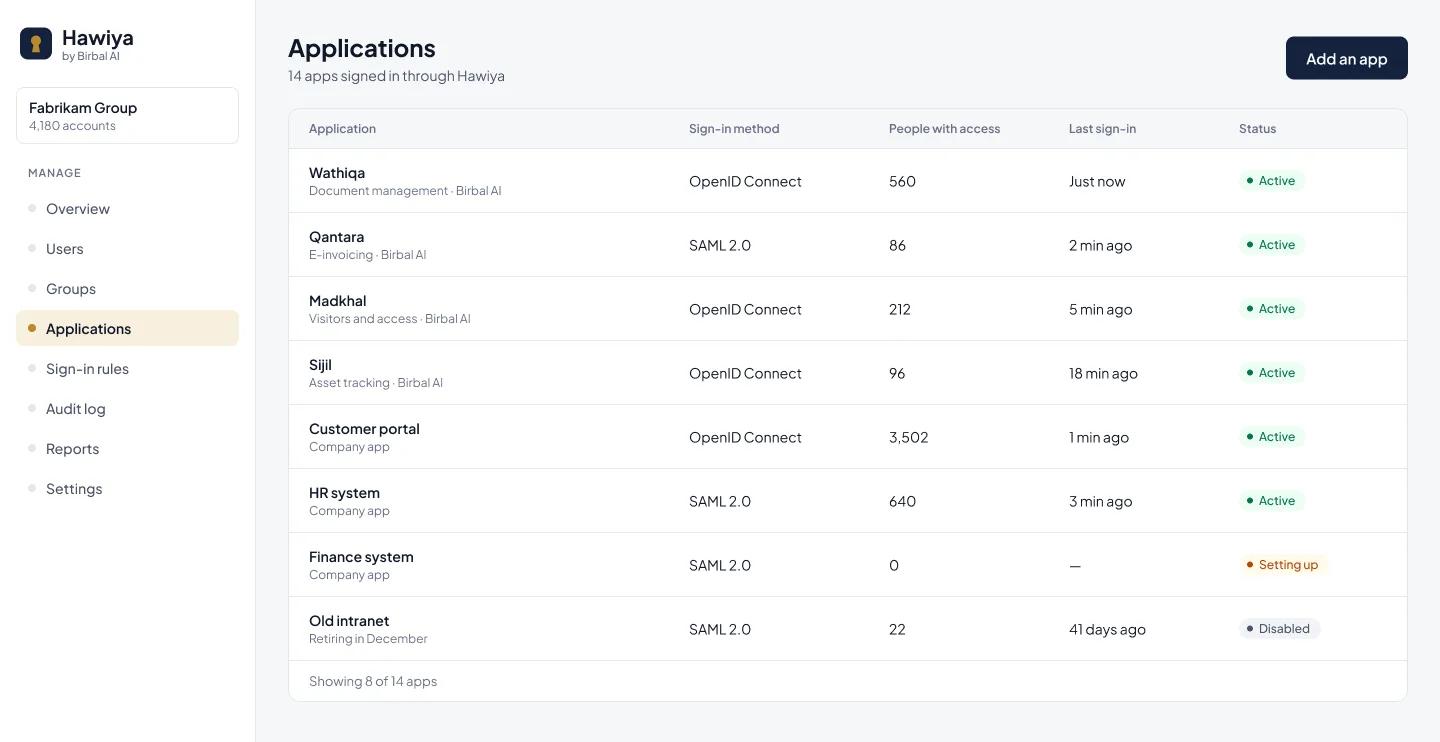
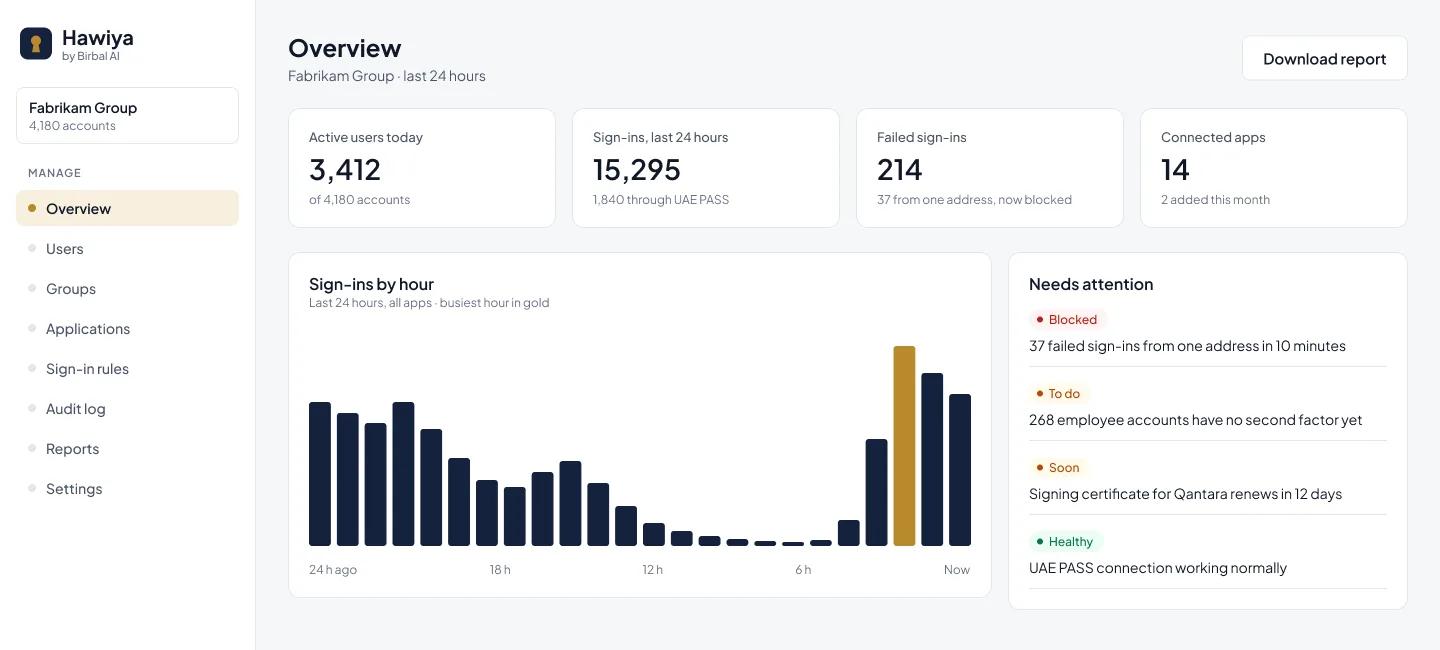
Hawiya screens for a company with employees, contractors and customers.
One sign-in for every app
People sign in once, and connected apps trust that sign-in over SAML 2.0 or OpenID Connect.
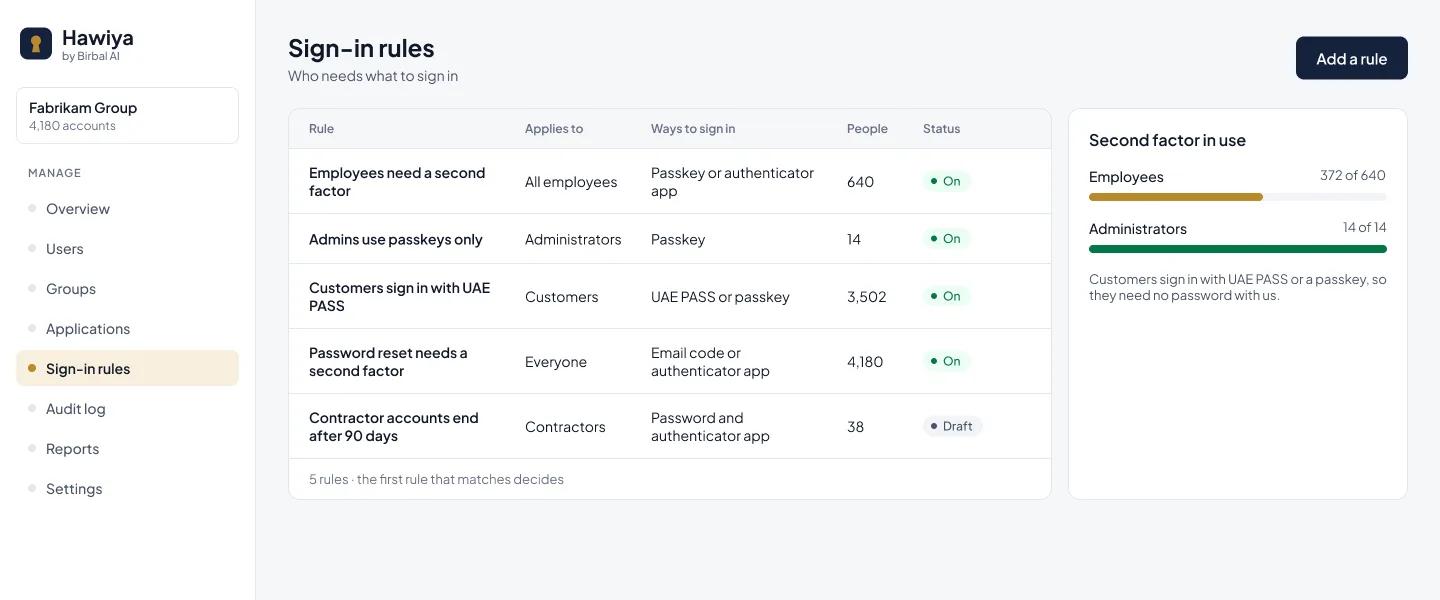
Clear rules for each group
Each group gets the ways to sign in it is allowed, and the first rule that matches decides.
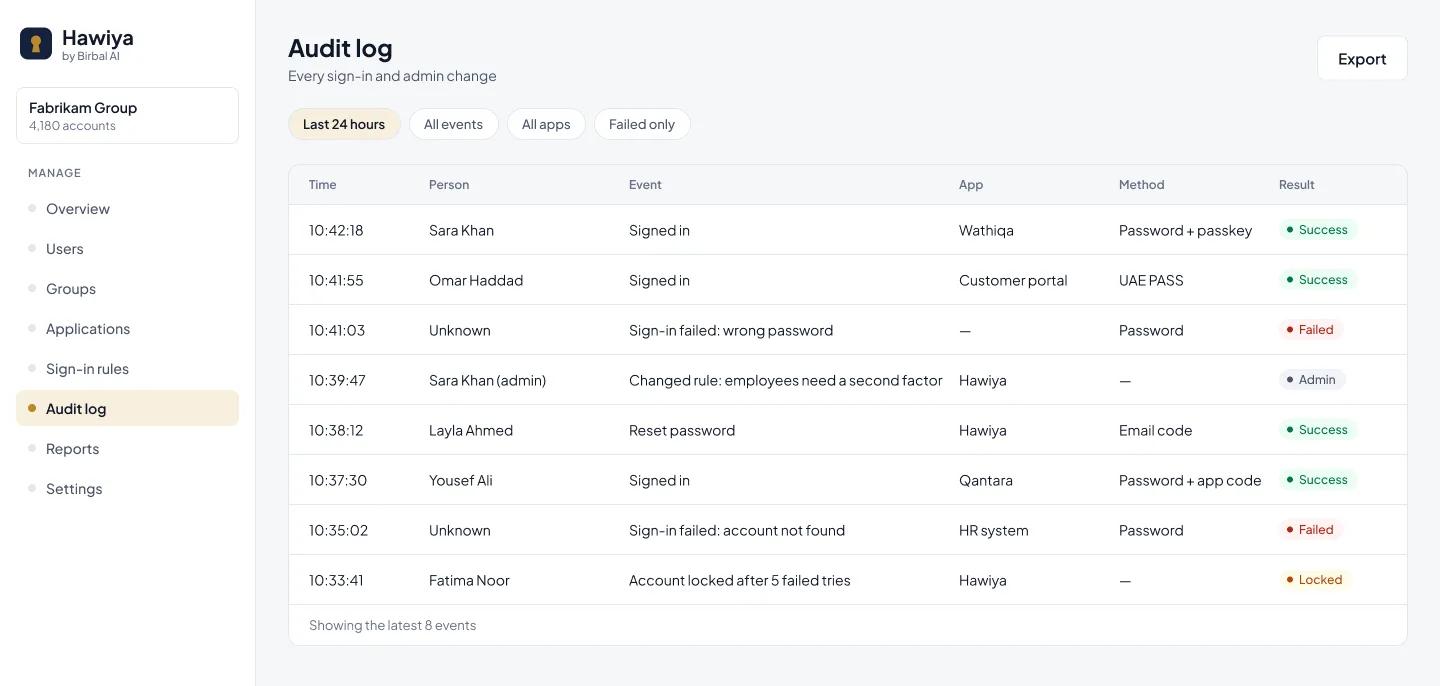
Everything on record
Every sign-in and admin change goes in the audit log, with the person, the time and the result.
Licensing
License Hawiya on your servers or in the cloud
Hawiya is sold as a software licence, not a one-off project. You choose where it runs; the product, updates and support are the same.
On-premise licence
Runs on your servers
Install Hawiya in your data center, in your private cloud tenant or on an isolated network with no internet connection.
- Annual licence, priced by the number of users
- Your data never leaves your network
- Installation, training and updates included
- Support with agreed response times
Cloud subscription
Hosted for you
We run Hawiya for you in a UAE data center, or in a cloud region in your country.
- Monthly or annual subscription, priced by the number of users
- Hosting, backups and monitoring included
- Updates applied for you
- Single sign-on and role-based access
The price depends on the number of users and the support level. We reply within one business day and send a written quote after a short scoping call.
Sources
Where the Keycloak, Microsoft and ManageEngine facts come from
Checked on 26 November 2026.
Book a walkthrough
See your Active Directory sign people in to every app
Tell us about your directory and the apps your people use. We show Hawiya reading users and groups, adding a second factor and signing in to your apps, in Arabic or English.
- Your directory and apps
- In Arabic or English
- Under NDA if you need one
4.9/5 average rating · 98% client satisfaction · 150+ clients served
FAQ
Active Directory, LDAP and single sign-on, answered
What is Active Directory SSO?
Single sign-on where people use their Active Directory account to sign in once and reach every connected app. An identity provider such as Hawiya checks the account against Active Directory and passes the sign-in to each app over SAML 2.0 or OpenID Connect.
Is Active Directory an identity provider?
Not for web apps on its own. Active Directory signs people in to Windows and the network, with Kerberos and LDAP; web and cloud apps expect an identity provider that speaks SAML 2.0 or OpenID Connect, such as AD FS, Microsoft Entra ID or Hawiya, in front of it.
What is LDAP?
The Lightweight Directory Access Protocol, the standard way to read a directory of users and groups and check their passwords. Active Directory supports it, and so do directories such as OpenLDAP. Hawiya reads your directory over LDAP on an encrypted LDAPS connection.
Does Hawiya copy our passwords from Active Directory?
No. Passwords stay in Active Directory and are checked there at each sign-in. A new password set through Hawiya’s self-service reset is written to the directory, over an encrypted connection, when you allow it.
Is Hawiya an alternative to AD FS?
For web apps over SAML 2.0 and OpenID Connect, yes. Microsoft’s own guidance is to move apps from AD FS to Microsoft Entra ID, its cloud service; Hawiya is the option when sign-in has to stay on your servers, or be hosted in the UAE or India.
Is Hawiya an alternative to ManageEngine AD360?
For sign-in, yes: single sign-on, multi-factor sign-in and self-service password reset, with UAE PASS and Arabic screens. AD360 also manages, audits and backs up Active Directory itself, which Hawiya does not do, so keep a tool for that if you need it.
What happens when someone leaves?
Disable their account in Active Directory as you do today. Their next sign-in through Hawiya fails for every connected app, and an administrator can end their open sessions from Hawiya’s admin console.
How is Hawiya licensed?
As an annual on-premise licence installed on your servers, private cloud or an isolated network, or as a monthly or annual cloud subscription that we host in a UAE data center or a cloud region in your country. Both include updates and support.
Your directory, one sign-in for every app
Book a Hawiya walkthrough with your Active Directory.
Book a Hawiya walkthrough