Hawiya · هوية · Single sign-on
Single sign-on (SSO) for every app your people use.
With Hawiya, people sign in once, with a passkey or a second factor, and every connected app opens without another password. Apps connect over SAML 2.0 or OpenID Connect, users can come from your existing directory, and every sign-in is on record. It runs on your servers or is hosted for you in the UAE or India.
- SAML 2.0 and OpenID Connect
- Your directory stays the source of users
- One place to turn access off
Authorized vendor to
- Ministry of Finance
- Ministry of Interior
- DGE Abu Dhabi
- Etihad Aviation
- EDGE Group
Delivered for
- Hindustan Unilever
- Nokia
- Linde
- USA Today
- JSL
Procurement-ready
- Emirati national company
- National ICV certificate
- Abu Dhabi Government Procurement Gate
- UAE Ministry of Finance, federal procurement
- Registered ADNOC vendor
Why single sign-on
Fewer passwords, and one place to close an account
One strong sign-in instead of many weak ones
People prove who they are once, with a passkey or a second factor, instead of keeping a password for every app.
Leavers lose access everywhere at once
Turn off one account in Hawiya and the person can no longer start a sign-in to any connected app.
Fewer reset calls
Self-service password reset and unlock, protected by a second factor, take those calls off the helpdesk.
How it works
What happens when someone opens an app
- 01
Open the app
The app sees no session and sends the person to Hawiya, over SAML 2.0 or OpenID Connect.
- 02
Sign in once
Hawiya checks the password and the second factor, a passkey, or UAE PASS, according to the person’s sign-in rule.
- 03
Signed answer
Hawiya sends the app a signed answer, a SAML assertion or an OpenID Connect token, saying who the person is.
- 04
Open the next app
The next connected app sends the person to Hawiya, which already knows them, so it opens without another sign-in.
Standards
Connects the way your apps already expect
SAML 2.0
For enterprise apps and older portals that sign in with SAML, configured with metadata and signing certificates.
OpenID Connect
For modern web and mobile apps, with tokens your developers can use against your own APIs.
Your directory
Users read from Active Directory or LDAP, or signed in through Microsoft Entra ID or Google, where you keep them today.
Product tour
Apps, sign-in rules and the audit log
Screens from Hawiya.
Add an app
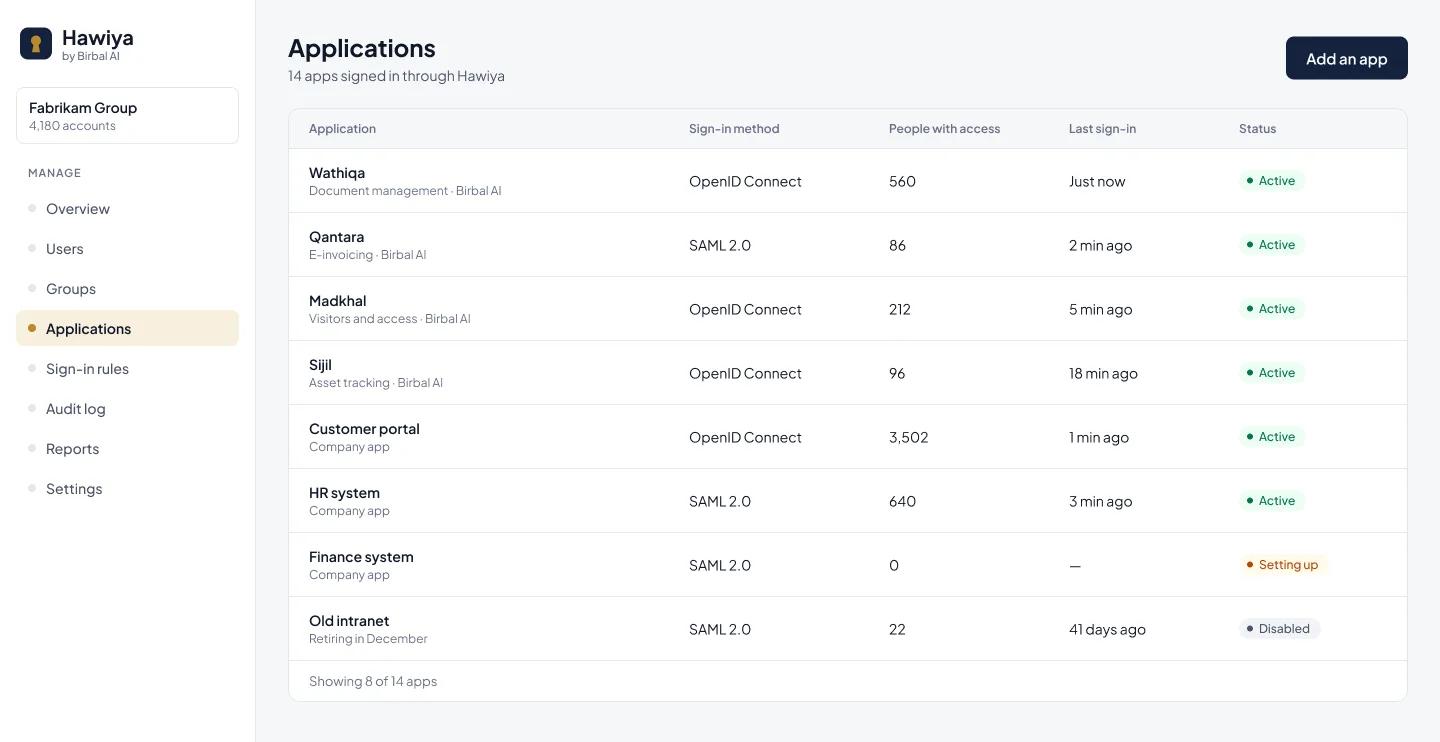
Choose SAML 2.0 or OpenID Connect, exchange the details with the app, and decide which groups may use it.
See who can reach what
A report lists who can open each app, for access reviews and audits.
Spot trouble early
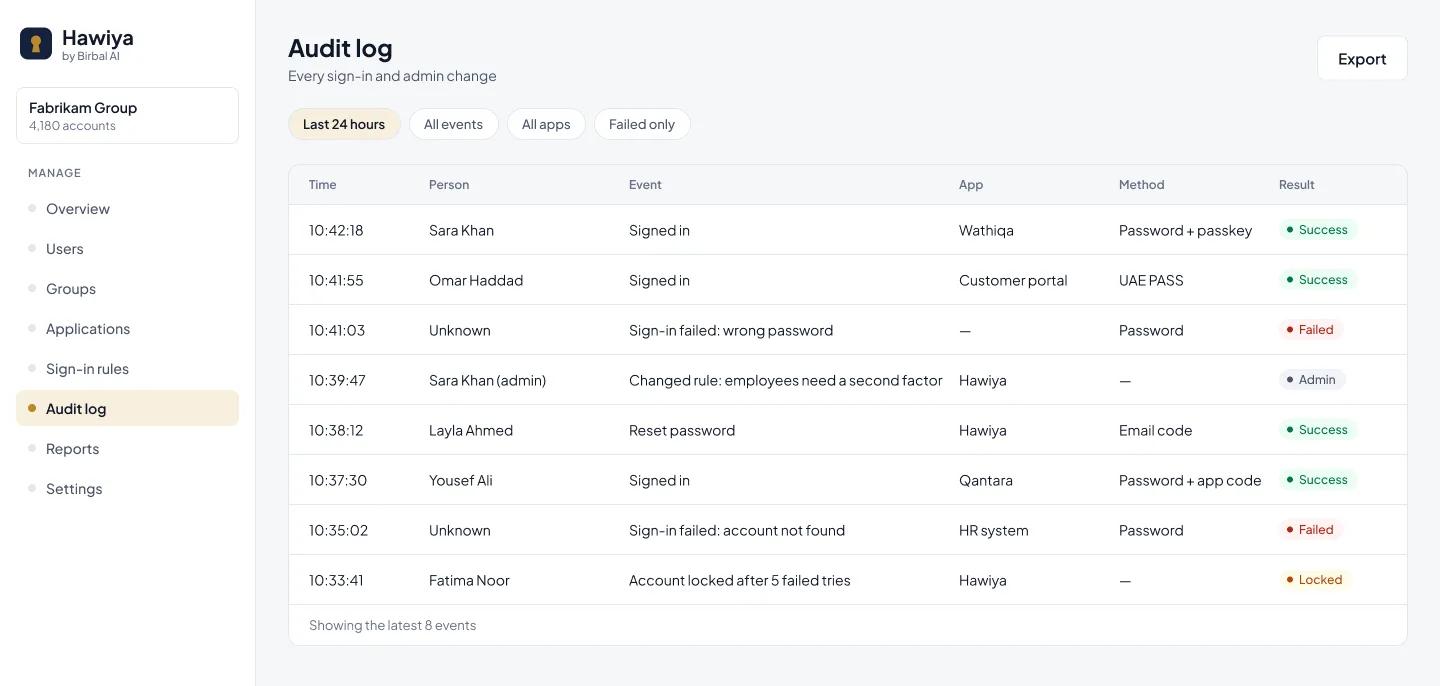
Repeated failed sign-ins from one address are flagged on the overview, and Hawiya is designed to block them.
Compared
Single sign-on and separate passwords
| Feature | With Hawiya SSO | A password for each app |
|---|---|---|
| Passwords per person | One sign-in, with a passkey or a second factor | One for each app, often reused |
| Second factor | Set once in Hawiya for every connected app | Set up app by app, where the app supports it |
| When someone leaves | One account to turn off | Every account closed separately |
| Audit | Every sign-in in one log | Logs scattered across apps |
Choosing
Choosing an SSO solution: what to ask any SSO provider
Whichever single sign-on software you pick, these six answers decide whether it fits your organisation.
Where does it run?
In the provider’s cloud, in a region in your country, or on your own servers. Hawiya runs on your servers, even with no internet connection, or is hosted for you in the UAE or India.
Which standards?
SAML 2.0 and OpenID Connect connect almost every business app, and leave you free to change provider later by configuration rather than rebuilding.
What is the real cost?
The price per user, any annual minimum, add-ons, and which plan the features you need sit in.
Who keeps it running?
Upgrades, security fixes, backups and a standby server. Free software leaves these to you; a Hawiya licence includes updates and support.
Does it speak your users’ language?
Sign-in pages, emails and the admin console in Arabic and English, right to left, with UAE PASS where your users have it.
Where are users kept?
Your directory stays the source of users: Active Directory, LDAP, Entra ID or Google.
SSO pricing compared: Okta, Auth0, Entra ID, OneLogin and Cognito
Licensing
License Hawiya on your servers or in the cloud
Hawiya is sold as a software licence, not a one-off project. You choose where it runs; the product, updates and support are the same.
On-premise licence
Runs on your servers
Install Hawiya in your data center, in your private cloud tenant or on an isolated network with no internet connection.
- Annual licence, priced by the number of users
- Your data never leaves your network
- Installation, training and updates included
- Support with agreed response times
Cloud subscription
Hosted for you
We run Hawiya for you in a UAE data center, or in a cloud region in your country.
- Monthly or annual subscription, priced by the number of users
- Hosting, backups and monitoring included
- Updates applied for you
- Single sign-on and role-based access
The price depends on the number of users and the support level. We reply within one business day and send a written quote after a short scoping call.
Security
One front door, held to a higher standard
A second factor for everyone
Single sign-on puts one sign-in in front of every app, so Hawiya pairs it with passkeys, authenticator apps or UAE PASS.
Signed and short-lived
Apps receive signed SAML assertions or OpenID Connect tokens, and sessions end after the idle time you set.
Lockout after failed tries
Accounts lock after the number of failed attempts you set, and repeated failures from one address are flagged.
Where you choose
On your servers, on an isolated network, or hosted for you in the UAE or India.
Book a walkthrough
See your apps behind one sign-in
Tell us which apps your people use and where your users are kept today. We show you how each would connect to Hawiya, in Arabic or English.
- SAML 2.0 and OpenID Connect
- Your directory stays in place
- Under NDA if you need one
4.9/5 average rating · 98% client satisfaction · 150+ clients served
FAQ
Single sign-on, answered
What is single sign-on (SSO)?
Single sign-on lets a person sign in once and open every connected app without signing in again. The apps trust a signed answer from the sign-in service, here Hawiya, instead of keeping their own passwords.
What is the difference between SAML and OpenID Connect?
Both let an app trust a sign-in done elsewhere. SAML 2.0 sends a signed XML assertion and is common in enterprise apps and older portals. OpenID Connect sends signed tokens over OAuth 2.0 and suits modern web and mobile apps. Hawiya supports both.
Do our apps need to change?
Apps that already support SAML 2.0 or OpenID Connect connect by configuration. An in-house app without either needs a small change to send people to Hawiya; your developers or ours can make it.
Isn’t one sign-in a single point of failure?
It is one door, so Hawiya makes it a strong one: passkeys or a second factor for every sign-in, lockout after failed tries, short sessions and a full audit log. Hawiya is designed to run on more than one server with a standby, hosted or on your servers.
Can we keep Active Directory?
Yes. Hawiya reads users and groups from Active Directory or LDAP, so joiners and leavers are still handled where you handle them today.
What does an SSO provider do?
It runs the sign-in service your apps trust: it checks who the person is, asks for a second factor where your rules say so, and sends each app a signed answer. Hawiya is an SSO provider you can run on your own servers or have hosted for you in the UAE or India.
Is there SSO for small business?
Yes. Single sign-on helps any team that uses several apps, not only large companies. Hawiya is licensed by the number of users, and when it is hosted for you there are no servers to run. Among cloud providers, OneLogin lists a Basic plan at $3 per user per month (US price), and Okta’s Starter plan is $6 per user per month with a $1,500 annual minimum.
Is there cheap SSO that is still secure?
The price per user is only part of it. Published prices start at $3 per user per month for OneLogin Basic and $6 for Okta Starter, with a $1,500 annual minimum; Microsoft Entra ID P1 is $7. Keycloak is free software, but you run, patch and support it yourself. Some apps also charge more for a plan that allows single sign-on, the so-called SSO tax. Whatever you pay, a passkey or a second factor at sign-in is what keeps it secure.
Does Hawiya work for apps on our internal network?
Yes. On your own servers, Hawiya can sign people in to internal apps on a network with no internet connection.
How is Hawiya licensed?
As an annual on-premise licence installed on your servers, private cloud or an isolated network, or as a monthly or annual cloud subscription that we host in a UAE data center or a cloud region in your country. Both include updates and support.
One sign-in, every app, one place to turn it off
Book a Hawiya walkthrough with your list of apps.
Book a Hawiya walkthrough