Hawiya · هوية · Passwordless authentication
Passwordless authentication with passkeys for staff, administrators and customers.
A passkey replaces the password with a key kept on the person’s phone, laptop or security key and unlocked with a fingerprint, face or PIN. It only works on your real sign-in page, so there is nothing to phish and nothing to reuse. Hawiya is designed to let you go passwordless one group at a time: administrators first, then staff, then customers, with UAE PASS where people already use it.
- Phishing-resistant FIDO passkeys
- One group at a time
- A safe way back in when a device is lost
Authorized vendor to
- Ministry of Finance
- Ministry of Interior
- DGE Abu Dhabi
- Etihad Aviation
- EDGE Group
Delivered for
- Hindustan Unilever
- Nokia
- Linde
- USA Today
- JSL
Procurement-ready
- Emirati national company
- National ICV certificate
- Abu Dhabi Government Procurement Gate
- UAE Ministry of Finance, federal procurement
- Registered ADNOC vendor
How passkeys work
What is a passkey, and why it ends the password
The FIDO Alliance defines a passkey as a FIDO credential that lets people sign in the same way they unlock their device.
A key pair, not a secret
When someone registers, their device makes a pair of keys for your sign-in page. Your servers keep only the public key, so a stolen copy of them holds nothing anyone can sign in with.
Unlocked on the device
The person confirms with a fingerprint, face, PIN or a touch of a security key. A fingerprint or face, if used, never leaves the device.
Tied to your real site
A passkey only answers the sign-in page it was made for, so a look-alike page gets nothing. Codes typed by hand can be passed on to a fake page; passkeys can’t.
Synced or kept on one key
Passkeys can sync across a person’s own devices, or stay bound to one security key, which suits administrators and shared desks.
Open standards
Passkeys follow the FIDO Alliance’s standards and WebAuthn, the browser standard they wrote with the W3C, so they work in current browsers and phones.
Part of Keycloak
Keycloak, which Hawiya is built on, made passkeys a supported feature in version 26.4, released on 30 September 2025.
Compared
Passkeys compared with passwords and one-time codes
How each way of signing in holds up against the attacks that matter.
| Question | Passkey | Password and app code | Password and text-message code | Password alone |
|---|---|---|---|---|
| Can a fake sign-in page capture it? | No: it only answers your real site | Yes: the code can be typed into a fake page | Yes: the code can be typed into a fake page | Yes |
| Can it be reused on other sites? | No: each site gets its own | The password can be | The password can be | Often |
| What a breach of your servers exposes | Public keys, useless to an attacker | Password hashes | Password hashes and phone numbers | Password hashes |
| What the person does | Fingerprint, face or PIN | Type a password, open the app, type the code | Type a password, wait for a text, type the code | Type a password |
| Works without a phone signal | Yes | Yes | No | Yes |
Going passwordless
Going passwordless without locking anyone out
- 01
Administrators first
A rule makes passkeys the only way in for the accounts that can change the most, ideally on security keys.
- 02
Offer passkeys to staff
People add a passkey the next time they sign in, while their password still works.
- 03
Watch the coverage
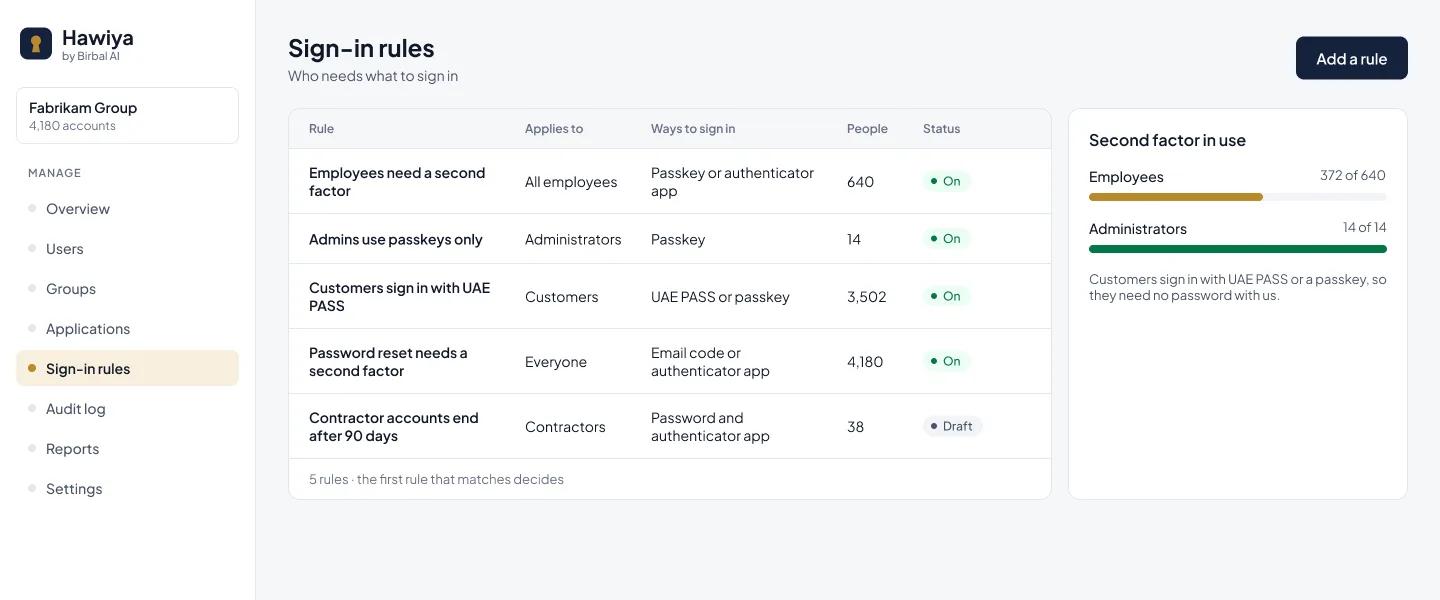
The sign-in rules screen shows how many people in each group have a second factor, and who still relies on a password.
- 04
Retire the password
Switch the group’s rule to passkeys only. Anyone who loses their device goes to the helpdesk for a one-time recovery pass.
Product tour
Passkeys in Hawiya’s sign-in page and rules
Hawiya screens for a company with employees, contractors and customers.
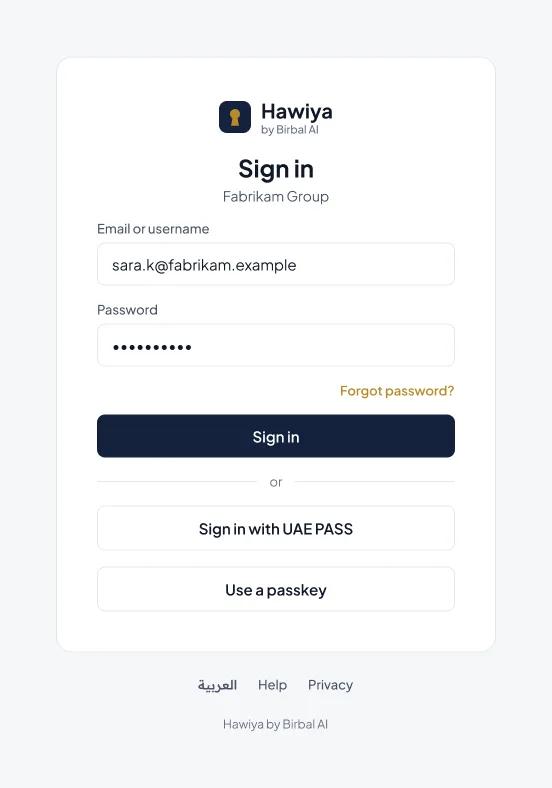
One button for passkeys
People choose “Use a passkey” and confirm on their device; no password to type.
Rules by group
Each group gets the ways in it is allowed, so you move one group at a time.
Every sign-in on record
The audit log shows which method each person used, and when.
For customers
Passwordless sign-in for customer portals and apps
The same passkeys work for the people you serve, on the phones they already carry.
No password to forget
Customers sign in with a passkey, so there is no password to reset, reuse or leak.
UAE PASS in the UAE
Customers who use UAE PASS can sign in with it instead, once your organisation has completed UAE PASS onboarding.
Your brand, in Arabic
Sign-in and sign-up pages in your brand, in Arabic and English, right to left.
Licensing
License Hawiya on your servers or in the cloud
Hawiya is sold as a software licence, not a one-off project. You choose where it runs; the product, updates and support are the same.
On-premise licence
Runs on your servers
Install Hawiya in your data center, in your private cloud tenant or on an isolated network with no internet connection.
- Annual licence, priced by the number of users
- Your data never leaves your network
- Installation, training and updates included
- Support with agreed response times
Cloud subscription
Hosted for you
We run Hawiya for you in a UAE data center, or in a cloud region in your country.
- Monthly or annual subscription, priced by the number of users
- Hosting, backups and monitoring included
- Updates applied for you
- Single sign-on and role-based access
The price depends on the number of users and the support level. We reply within one business day and send a written quote after a short scoping call.
Sources
Where the passkey facts come from
Checked on 26 November 2026.
Book a walkthrough
See a passkey replace a password
We show a passkey being registered and used, the sign-in rule that makes it required, and the record it leaves, in Arabic or English.
- For staff and customers
- In Arabic or English
- Under NDA if you need one
4.9/5 average rating · 98% client satisfaction · 150+ clients served
FAQ
Passwordless authentication and passkeys, answered
What is passwordless authentication?
Signing in without typing a password. With a passkey, the person proves who they are with a key on their device, unlocked by a fingerprint, face or PIN; in the UAE, UAE PASS is another way in. A passkey with a fingerprint, face or PIN is also multi-factor: it needs the device and the person.
What are passkeys?
FIDO credentials that replace passwords. Each passkey is a pair of keys made for one site: the private key stays on the person’s phone, laptop or security key, and the site keeps only the public key.
Are passkeys safe?
They resist phishing, because each passkey only answers the site it was made for, and there is no shared secret on your servers to steal or reuse. The weak point moves to recovery, which is why Hawiya sends people who lose their device through an identity check at the helpdesk.
Do passkeys work on every device?
Current phones, laptops and browsers support them, and people without a suitable device can use a security key. Until everyone has one, a group can keep a fallback such as a password with an authenticator app.
What happens if someone loses the phone with their passkey?
Passkeys synced by the phone’s maker come back when the person signs in to their account on a new phone. Otherwise the helpdesk checks their identity, removes the lost passkey and gives them a one-time recovery pass, limited in time and logged, so they can register a new one.
Can administrators go passwordless first?
Yes. A sign-in rule can allow only passkeys for administrators, ideally on security keys, before anyone else changes how they sign in.
Is a passkey the same as FIDO2?
FIDO2 is the name for the FIDO Alliance’s standards behind passkeys, including WebAuthn. Security keys that support FIDO2 can hold passkeys bound to that one key.
How is Hawiya licensed?
As an annual on-premise licence installed on your servers, private cloud or an isolated network, or as a monthly or annual cloud subscription that we host in a UAE data center or a cloud region in your country. Both include updates and support.
Retire the password, one group at a time
Book a Hawiya walkthrough for your groups.
Book a Hawiya walkthrough