Hawiya · هوية · Self-service password reset
Self-service password reset (SSPR) and account unlock, without a call to the helpdesk.
Forgotten passwords and locked accounts fill the helpdesk queue, and every reset done over the phone is a chance for someone to talk their way in. With Hawiya, people reset their own password or unlock their account from the sign-in page, after proving who they are with a second factor they registered earlier. For accounts that come from Active Directory or LDAP, Hawiya is designed to write the new password back to the directory.
- Checked with a second factor
- Written back to Active Directory or LDAP
- Every reset on record
Authorized vendor to
- Ministry of Finance
- Ministry of Interior
- DGE Abu Dhabi
- Etihad Aviation
- EDGE Group
Delivered for
- Hindustan Unilever
- Nokia
- Linde
- USA Today
- JSL
Procurement-ready
- Emirati national company
- National ICV certificate
- Abu Dhabi Government Procurement Gate
- UAE Ministry of Finance, federal procurement
- Registered ADNOC vendor
How it works
How a self-service password reset works in Hawiya
- 01
Forgot password
The person chooses “Forgot password” on Hawiya’s sign-in page, on any device, in Arabic or English.
- 02
Prove who they are
They confirm with a second factor registered earlier: a passkey, an authenticator app code, or a code by email or text message, as your rules allow.
- 03
Choose a new password
Your password rules apply, such as length and not reusing an old password.
- 04
Back to work
The new password goes to Active Directory or LDAP where the connection may write, and the reset goes in the audit log.
What it covers
Reset, unlock and recovery, in one place
The same identity check guards every way back in.
Password reset
From the sign-in page on a phone or computer, checked with a second factor before anything changes.
Account unlock
People locked out after too many failed attempts unlock their account themselves, after the same check.
A lost second factor
The helpdesk checks the person’s identity and gives a one-time recovery pass, limited in time and logged, so they can register a new passkey or app.
Your directory stays the source
For accounts from Active Directory or LDAP, the new password is set in the directory itself, so other systems that check it use the same password.
Rules you set
Which second factors may confirm a reset for each group; administrators can be kept to passkeys only.
On record
Each reset, unlock and failed attempt in the audit log with the person, the method and the time, exportable to your security monitoring.
Compared
Hawiya and ManageEngine ADSelfService Plus compared
ADSelfService Plus is built around Active Directory and the Windows login screen; Hawiya around single sign-on to web apps. The ADSelfService Plus column comes from ManageEngine’s own pages.
| Feature | Hawiya | ManageEngine ADSelfService Plus |
|---|---|---|
| Reset from a web page | Yes, from Hawiya’s sign-in page | Yes, from its self-service portal |
| Reset and unlock from the computer’s login screen | Not in version 1 | Yes, with a login agent on Windows, macOS or Linux |
| Check before a reset | Passkeys, authenticator apps, email codes, and text messages through a local provider | More than 15 authentication methods |
| Single sign-on to web apps | SAML 2.0 and OpenID Connect, with UAE PASS | SAML, OIDC and OAuth apps |
| Passwords in other apps | Apps connected to Hawiya trust its sign-in, so they keep no password of their own | Syncs password resets and changes to other enterprise applications |
| MFA for VPN and remote desktop | Not in version 1 | Yes |
Product tour
The way back in, and the record it leaves
Hawiya screens for a company with employees, contractors and customers.
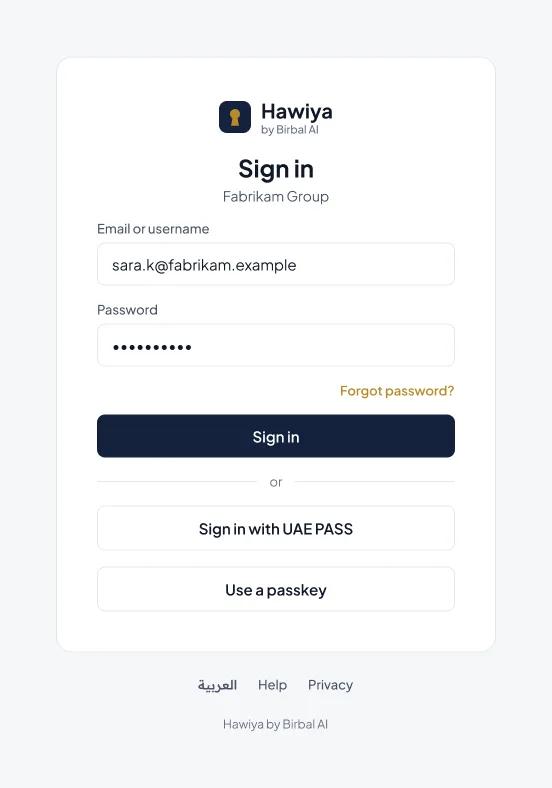
A reset starts at sign-in
No separate portal for people to find: the link sits where they already are.
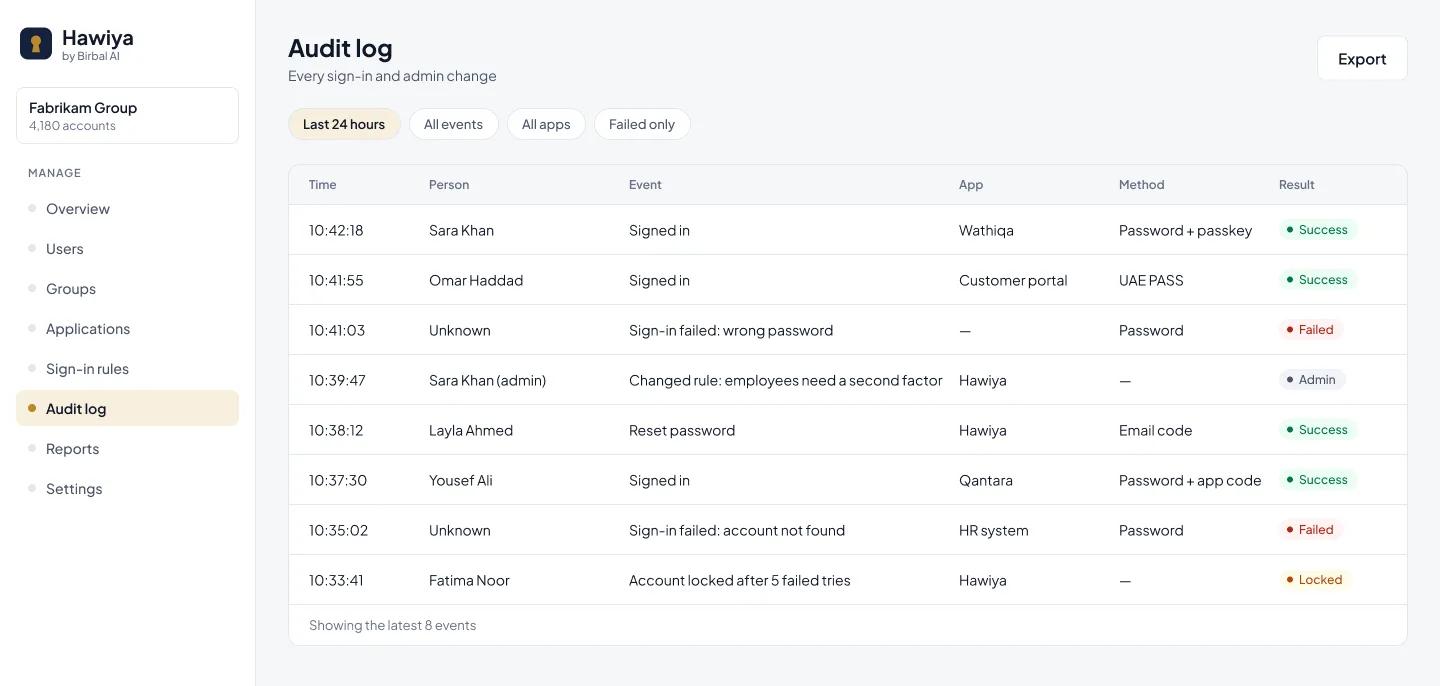
Lockouts you can see
Locked accounts and repeated failures show in the log and on the overview.
Admin changes too
Resets done by the helpdesk are logged with the administrator and the time.
Licensing
License Hawiya on your servers or in the cloud
Hawiya is sold as a software licence, not a one-off project. You choose where it runs; the product, updates and support are the same.
On-premise licence
Runs on your servers
Install Hawiya in your data center, in your private cloud tenant or on an isolated network with no internet connection.
- Annual licence, priced by the number of users
- Your data never leaves your network
- Installation, training and updates included
- Support with agreed response times
Cloud subscription
Hosted for you
We run Hawiya for you in a UAE data center, or in a cloud region in your country.
- Monthly or annual subscription, priced by the number of users
- Hosting, backups and monitoring included
- Updates applied for you
- Single sign-on and role-based access
The price depends on the number of users and the support level. We reply within one business day and send a written quote after a short scoping call.
Sources
Where the directory and ManageEngine facts come from
Checked on 26 November 2026.
- Keycloak Server Administration Guide: LDAP and Active Directory, edit modes and password checks (keycloak.org)
- Microsoft: Change an Active Directory user password through LDAP, over an encrypted connection (learn.microsoft.com)
- ManageEngine ADSelfService Plus features (manageengine.com)
- ManageEngine ADSelfService Plus: overview in the admin guide (manageengine.com)
Book a walkthrough
See a password reset done without the helpdesk
We show a reset and an unlock checked with a second factor, the new password reaching your directory, and the record in the audit log, in Arabic or English.
- Your directory and apps
- In Arabic or English
- Under NDA if you need one
4.9/5 average rating · 98% client satisfaction · 150+ clients served
FAQ
Self-service password reset, answered
What is self-service password reset (SSPR)?
Letting people reset a forgotten password, or unlock their account, themselves after proving who they are, instead of calling the helpdesk. The check is what makes it safe: Hawiya asks for a second factor the person registered earlier.
Does the new password reach Active Directory?
Yes, when Hawiya’s connection to Active Directory is allowed to write passwords. Active Directory accepts password changes over LDAP only on an encrypted connection, so the connection uses LDAPS. Keycloak, which Hawiya is built on, writes password changes to the directory in its writable mode and never copies passwords out of it.
How do people prove who they are before a reset?
With a second factor they registered earlier: a passkey, an authenticator app, or a code by email or text message through a local provider, as your rules allow for each group.
What if someone has also lost their phone?
The helpdesk checks their identity and gives a one-time recovery pass, limited in time and logged. They register a new second factor with it, then reset their password.
Can people reset their password from the Windows login screen?
Not with Hawiya version 1: resets happen on Hawiya’s sign-in page, in a browser on any device. Tools such as ManageEngine ADSelfService Plus put an agent on each computer for that.
Is Hawiya an alternative to ManageEngine ADSelfService Plus?
For web sign-in, yes: self-service reset and unlock, multi-factor sign-in and single sign-on to SAML 2.0 and OpenID Connect apps, with UAE PASS and Arabic screens, on your servers or hosted in the UAE or India. If you need resets from the computer’s login screen or MFA for VPNs and remote desktop, ADSelfService Plus covers those and Hawiya version 1 does not.
Are resets logged?
Yes. Each reset, unlock and failed attempt goes in the audit log with the person, the method and the time, and can be exported to your security monitoring.
How is Hawiya licensed?
As an annual on-premise licence installed on your servers, private cloud or an isolated network, or as a monthly or annual cloud subscription that we host in a UAE data center or a cloud region in your country. Both include updates and support.
Fewer password calls, and every reset on record
Book a Hawiya walkthrough for your directory.
Book a Hawiya walkthrough